“Step-by-Step WordPress eCommerce Development Guide for Beginners” addresses the literal wall most entrepreneurs hit when their site suddenly has to process transactions. A blog is static, but a shop is a moving target. Most business owners realise quickly that a standard website cannot handle the database queries required for a high-traffic checkout. WooCommerce powers over 22% of all online stores globally and 26.6% of eCommerce websites, making WordPress the go-to for beginner eCommerce setups. If you are starting out, a structured WordPress eCommerce Development strategy is the only way to avoid broken links and payment failures. At Dreams to Life LLC, we provide the wordpress development services in portland necessary to turn a basic site into a revenue driver.
Selecting the right server environment
Most beginners choose the cheapest shared hosting available. This is a mistake. Shared hosting means your shop shares resources with hundreds of other sites. If one of those sites has a traffic surge, your checkout will slow down or fail completely. For an eCommerce site, you need managed WordPress hosting or a Virtual Private Server.
Load speed kills retention. If your checkout page hangs for even four seconds, customers assume the site is broken and leave. High-performance configurations aren’t optional for stores. As a wordpress ecommerce development company, we move beyond basic setups to implement server-side caching and global CDNs. This ensures heavy product imagery loads instantly, even on mobile connections in remote areas.
What are the foundational steps for WordPress eCommerce Development?
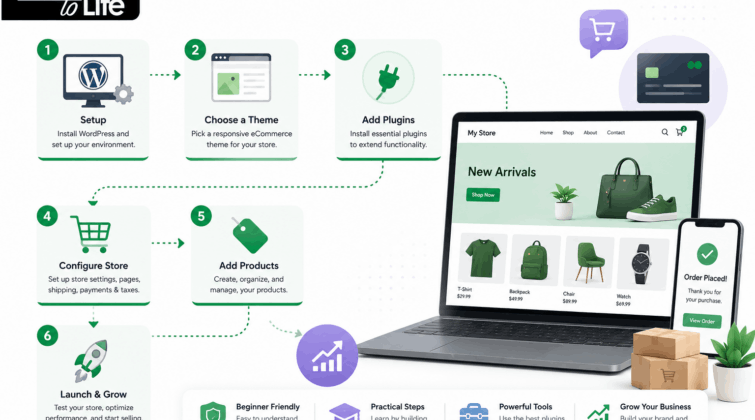
Setting up the commerce engine requires more than just clicking “install.” You have to bridge the gap between the raw software and your specific server environment. The database is often the first bottleneck.
- Software Installation: Use the host’s script but verify the directory permissions immediately.
- Commerce Integration: Activate WooCommerce and strip out the bloat during the initial wizard.
- Database Optimisation: Increase your PHP memory limit to at least 512MB. If the server doesn’t have the headroom to process complex order queries, you will see “Critical Error” messages at checkout.
Launching a store without these technical baselines leads to “white screen” errors during high-volume sales. We often help clients who tried to build their own shops and got stuck at the database connection stage. If you are struggling with these early hurdles, looking for a WordPress agency near me can save you weeks of troubleshooting.
Why is choosing a wordpress web design portland specialist vital for your brand?
Design is not just about colours and fonts; it is about the user journey from the landing page to the “Thank You” screen. A wordpress web design portland professional understands the local market and how to structure a site that builds trust immediately.
In the digital space, trust is fragile. If your buttons are misaligned or your text overlaps on mobile, customers assume your business is unprofessional. They will not put their credit card details into a site that looks broken. We suggest using a clean, responsive layout that prioritises the “Add to Cart” button above all other elements.
The technicality of wordpress theme design services
Many beginners buy a “bloated” theme from a marketplace that includes fifty features they do not need. These features use heavy code that slows down the site. Professional wordpress theme design services focus on lightweight, custom-coded solutions. We remove the excess scripts and focus on clean HTML and CSS. This ensures that your site is fast, secure, and easy for Google to crawl.
Configuring your payment and shipping logistics
This is where many shops fail. If your shipping rates are wrong, you will either lose money on every order or drive customers away with high costs. You must decide if you are offering flat-rate shipping, real-time carrier rates, or free shipping based on a spend threshold.
Payment gateways like Stripe and PayPal are the easiest to integrate. However, they have different fee structures. You should calculate these fees into your product pricing from day one. Do not forget to enable SSL (Secure Sockets Layer). Without a valid SSL certificate, browsers will flag your site as “Not Secure,” which is a death sentence for an eCommerce business.
Why you might need a wordpress ecommerce development company in Vancouver
If your goal is international expansion, the complexity of taxes and multi-currency support increases. A wordpress ecommerce development company in Vancouver can help you navigate the specific requirements for selling across borders, such as GST/HST calculations and international shipping integrations.
We see many shops struggle with regional tax laws because they used a generic plugin that wasn’t configured correctly. It is better to hire a professional team to audit your settings before you go live. Dreams to Life LLC manages these details so you can focus on inventory and marketing.
Scaling your store with the best WordPress company Portland offers
Building the shop is only the first half of the battle. The second half is maintaining it. WordPress and its plugins require regular updates. If you ignore these, your site becomes vulnerable to hackers. A single security breach can destroy your reputation and lead to legal issues.
The best WordPress company Portland has to offer will provide a maintenance plan that includes daily backups and real-time security monitoring. This is not an area where you should try to save money. The cost of a hacked site is always higher than the cost of prevention.
If you want a store that grows with your business, you need a partner who understands the long-term lifecycle of digital commerce. We handle the technical heavy lifting, from initial concept to year-over-year scaling. Reach out to Dreams to Life LLC today to discuss your project. We can help you build a shop that actually converts visitors into loyal customers.
Key Takeaways:
- Cheap hosting is the leading cause of checkout abandonment.
- WooCommerce requires significant server resources that standard plans lack.
- Encryption and firewalls must be active before the site goes live.
- Mobile UI dictates whether your traffic actually buys.
FAQ
How do I handle security on my new store?
Start with a host that provides a server-side firewall. Standard plugins like Wordfence are useful, but they cannot fix weak credentials. Use complex passphrases and force Two-Factor Authentication for all admin roles. You should also change your login URL to prevent brute-force bots from finding your entry point.
Is it expensive to maintain an eCommerce site?
Monthly costs include high-tier hosting, domain renewals, and plugin licensing for advanced shipping or email automation. You must also budget for technical maintenance. If your checkout breaks after a plugin update, the revenue loss will far exceed the cost of a professional support contract.
What is the best way to handle product images?
Unoptimised images will kill your mobile conversion rates. Compress every file before it hits your media library using a local tool or a server-side plugin. Use WebP formats where possible. High-resolution files should be reserved for the zoom-in feature, not the main category pages.
Can I run a multi-vendor marketplace on WordPress?
Yes, plugins like Dokan or WCFM allow you to turn a standard shop into a marketplace where other people can list and sell their own products. This adds significant complexity to your tax and commission structures, so professional setup is highly recommended.