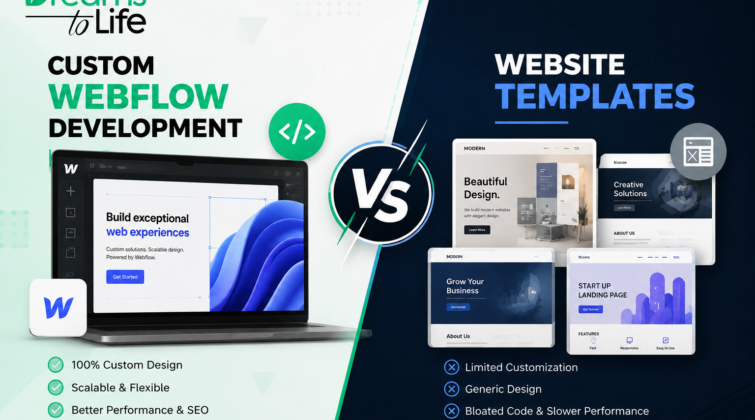
Choosing between a website template and a custom build comes down to one question: is your site meant to look fine, or is it meant to perform? A template gets you online quickly and cheaply. Custom Webflow Development takes longer and costs more upfront,but every stage of that Development is shaped around your customers, your content, and your goals from day one. Here in this blog we know which one is right for you.
Website Templates: Fast, Cheap, and Limited
There’s a reason templates are still the go-to for a lot of first websites:
- You can have a live site within a week, sometimes less.
- The upfront investment is a fraction of a custom build.
- Editing doesn’t require a developer, so your team can update it directly.
- What you see in the preview is exactly what you’ll get.
A template is designed to fit everyone, which quietly means it’s optimized for no one. Bloated code, unused sliders, and stacked plugins slow pages down and confuse both visitors and search engines, which is usually the point teams start searching for Custom Webflow Development Portland agencies, once their theme can’t support the booking flow, dashboard, or integration their business actually needs.
There’s also a structural ceiling most business owners don’t see coming. Templates are built around a fixed set of sections and layouts, so once your business needs something the theme’s creator never planned for a multi-step quote form, a member portal, a custom pricing calculator you’re stuck editing around the limitation instead of solving it directly.
Built Around Your Business
A custom Webflow build is based on your content, your conversion intentions, and your brand, rather than a premade theme built for a different kind of business. In other words: clean code without extra theme elements bogging down your pages, structure optimized around your real customers’ keyword research, and layouts shaped by how people actually behave on your site.
The same logic applies across formats. Content-heavy sites benefit from Webflow CMS development, since a custom CMS is modeled around how your team publishes, not forced into a template’s fixed fields. Online stores feel it even more it’s why Webflow ecommerce developers Vancouver WA businesses tend to focus on custom filtering and checkout flows a stock template can’t support. And beyond function, a custom site simply looks like nobody else’s, which matters when a prospect has already seen your layout on a competitor’s page.
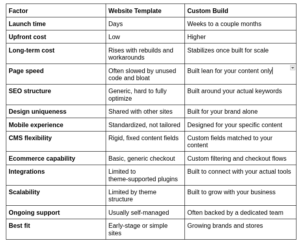
How the Two Options Compare at a Glance
The gap between the two isn’t just opinion. According to Data the median mobile home page has grown from 845 KB in 2015 to 2,362 KB today, a jump driven largely by unused code and heavy scripts that many sites never actually need.
Slow, bloated template code is one of the most common causes of that growth,
which is why businesses often choose to rebuild rather than keep patching a slow template. The table below breaks down how the two options stack up overall.
Matching the Right Build to Your Business Stage
Neither option is universally “better” the right choice depends on where your business actually stands right now:
- Choose a template if your budget is tight and your timeline is under a month.
- Choose a template if your site only needs standard, simple functionality.
- Choose custom if you expect real growth in traffic, content, or features soon.
Most businesses don’t sit at either extreme. Plenty of owners launch on a template just to test the idea, then switch to a custom build once they’ve outgrown it. Nothing wrong with that, it keeps costs low early on.
You’ll know it’s time to move on when the template starts fighting you back. You’re forcing layouts to do things they weren’t built for, or your site looks just like a competitor’s using the same theme. At that point, the time and leads you’re losing usually cost more than a custom build would.
The Long-Term Payoff of a Custom Webflow Build
Both paths can be the right call. A template is a fair choice if you need something live now and your needs are simple, and plenty of small sites do fine on one for years. But once your site has to carry real growth, more traffic, more content, more at stake with every visitor Custom Webflow Development gets you a build engineered around your customers instead of a generic theme.
That’s the gap DREAMS TO LIFE LLC builds to close, with sites designed around performance from day one. If your current site is holding back your rankings, load times, or conversions, it’s worth a real conversation before your next redesign.
Key Takeaways:
- Both options can be the right call; it depends on where your business is right now.
- Speed and cost make templates a reasonable starting point for many sites.
- Bloated code is the biggest hidden cost of sticking with a template too long.
- A site should scale with your business instead of holding it back.
- The clearest sign it’s time to switch is friction, not a fixed timeline.
Frequently Asked Questions
How long does a custom Webflow build take?
Most custom projects take anywhere from three to eight weeks, depending on the number of pages, whether you need Webflow CMS development, and how much content is ready before the build starts.
Is Webflow good for ecommerce stores?
Yes. Webflow handles product pages, cart flows, and payment integrations well, especially when a site is built by experienced Webflow ecommerce developers Vancouver WA businesses trust for custom checkout and filtering needs.
Can I switch from a template to a custom Webflow site later?
Yes, and many businesses do exactly that. Content and structure can usually be migrated, though a full redesign around your brand is often more effective than editing around the old template.
Do I need a developer to manage a custom Webflow site?
Not necessarily. Webflow's visual editor lets marketing teams update content directly, but working with a team offering ongoing Webflow development services helps with anything structural down the line.